 Deutsche version
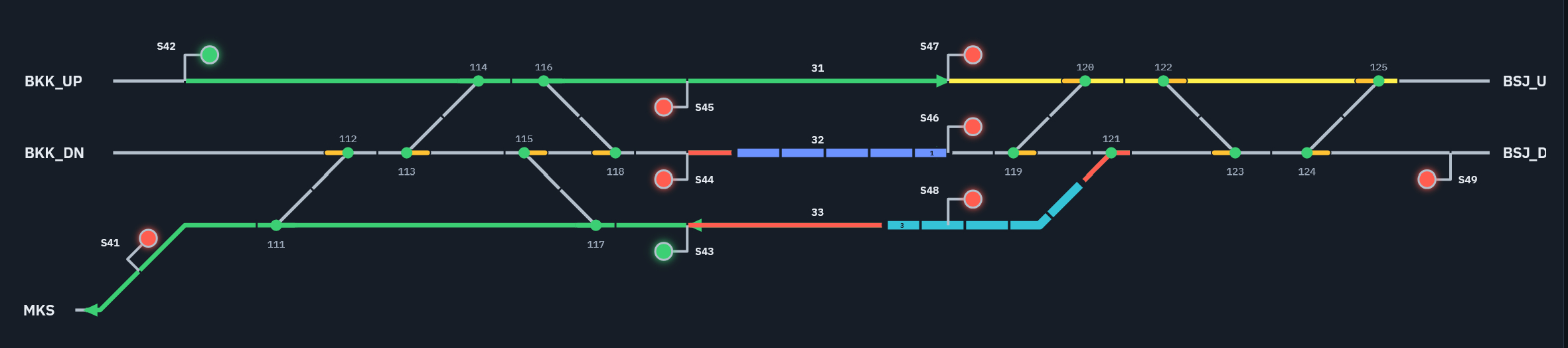
This learning tool, created using vibe coding, simulates a small interlocking area with a neutral user interface. The simulation can be launched directly in a web browser using the link below. The user interface can be switched between German, English, and Thai. Depending on the browser settings, the user interface will be displayed in dark or light mode. A simple animation of the train movements demonstrates the relationship between track clear detection and real train location.
The simulation is based on real-world railway infrastructure in Thailand (Chitlada station yard in the Bangkok area)). Routes can be set and cancelled, and trains can be introduced to run through the layout. All basic interlocking functions are implemented. Routes are released section by section behind the train. Since the points of a crossover have overlapping fouling point limits, they are not released independently. When a train passes through a crossover, the first set of points remains locked after the train has cleared it until the second set of points has also been cleared. The points are controlled by automatic point setting; individual manual operation is not provided. Flank protection follows the operating rules of the Thai railway, with the protective position of points assigned by coupled points of crossover. This may in some cases result in locking of flank transfer points. Overlaps are only provided for routes without speed limit. Overlaps are indicated by yellow colour. If for a train that should pass through the station yard without stopping, the overlap conflicts with the exit route, the exit route has to be set before the entrance route. On the station tracks, trains can be reversed. To reverse a train, there is a button in the control window of the signal at which the train has stopped.
Link to simulation (or click on picture)
Version from 8th Nov 2026